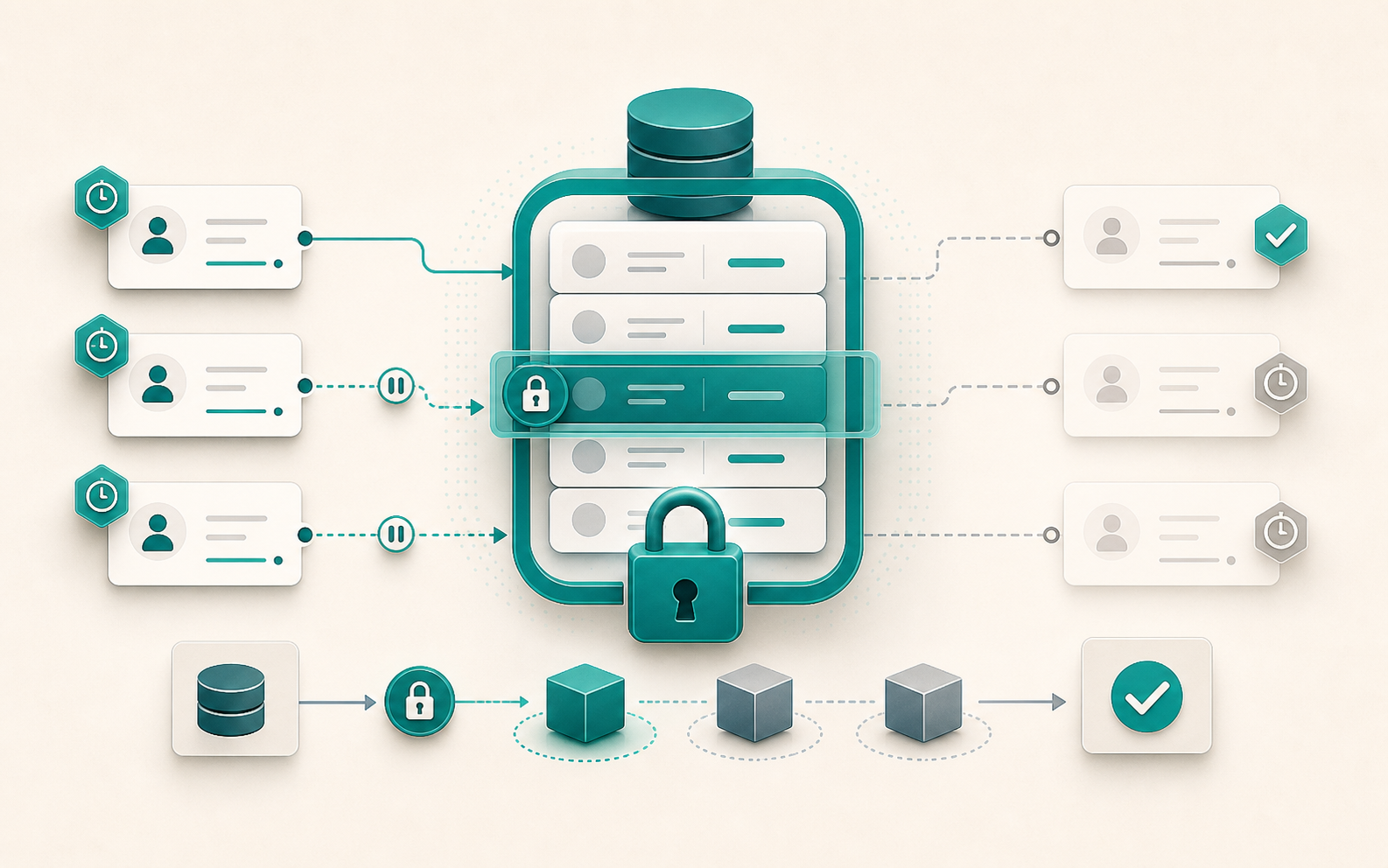
Two concurrent requests read a product’s stock, both see one unit remaining, and both confirm the order. Stock drops to -1. This kind of race condition is nearly impossible to reproduce in development and devastating in production. select_for_update() is Django’s answer: acquire a SQL lock at read time so no other transaction can modify the row before the current operation finishes.
What select_for_update() does in SQL
select_for_update() generates a SELECT ... FOR UPDATE. The lock is acquired as soon as the queryset is evaluated and held until the end of the transaction.atomic() block. Any other transaction that tries to acquire a lock on the same rows is blocked until the lock is released.
from django.db import transaction

with transaction.atomic():
    product = Product.objects.select_for_update().get(pk=pk)
    # No other transaction can modify product during this block
    product.stock -= quantity
    product.save()
Hard rule: select_for_update() must be called inside a transaction.atomic() block. Django raises TransactionManagementError otherwise.
Parameters that change the behavior
nowait=True: fail instead of wait
By default, a transaction that tries to lock already-held rows blocks until they are released. With nowait=True, Django generates FOR UPDATE NOWAIT and raises OperationalError immediately if the rows are locked.
from django.db import OperationalError, transaction

try:
    with transaction.atomic():
        account = Account.objects.select_for_update(nowait=True).get(pk=pk)
        account.balance -= amount
        account.save()
except OperationalError:
    raise AccountLocked("This account is currently being modified.")
Useful for APIs where blocking an HTTP request for several seconds is not acceptable.
Support: PostgreSQL, Oracle, MySQL 8.0+.
skip_locked=True: ignore locked rows
FOR UPDATE SKIP LOCKED is the standard pattern for task queues. Instead of blocking on locked rows, the queryset skips them and returns only available ones. Multiple workers can process tasks in parallel without blocking each other.
def claim_next_task(worker_id: int) -> Task | None:
    with transaction.atomic():
        task = (
            Task.objects
            .select_for_update(skip_locked=True)
            .filter(status="pending")
            .order_by("created_at")
            .first()
        )
        if task:
            task.status = "processing"
            task.worker_id = worker_id
            task.save()
        return task
Each worker calls this function and gets a different task, with no risk of conflict.
Support: PostgreSQL 9.5+, MySQL 8.0.1+.
of=(…): target specific tables to lock
When using select_related(), Django locks all joined tables by default. The of parameter (PostgreSQL only) lets you specify exactly which tables to lock.
# Locks order AND customer by default
Order.objects.select_related("customer").select_for_update().get(pk=pk)

# Locks only the orders table
Order.objects.select_related("customer").select_for_update(of=("self",)).get(pk=pk)
Without of, deadlocks can occur if other transactions lock the joined tables in a different order.
Support: PostgreSQL only.
no_key=True: weaker lock (PostgreSQL only)
FOR NO KEY UPDATE is a lighter lock: it blocks other FOR UPDATE acquisitions but does not interfere with SELECT FOR SHARE or INSERTs on child tables that reference this one via foreign key. Available since Django 3.2.
# Allows inserting OrderItems while Order is locked
order = Order.objects.select_for_update(no_key=True).get(pk=pk)
Pitfalls to avoid
.values() returns dicts, not instances
.values() does generate FOR UPDATE in the SQL and the lock is acquired. But the queryset returns dictionaries, making it impossible to call .save(). To limit the fields loaded while keeping model instances, use .only() instead.
# Lock acquired, but no instance → no .save()
Product.objects.select_for_update().values("stock").get(pk=pk)

# Lock active + instance + limited fields
Product.objects.select_for_update().only("stock", "pk").get(pk=pk)
Deadlocks come from locking order
If transaction A locks row 1 then row 2, and transaction B locks row 2 then row 1, a deadlock is guaranteed. The solution: always lock in a consistent order, for example by ascending pk.
# Consistent order to avoid deadlocks
accounts = Account.objects.select_for_update().filter(pk__in=ids).order_by("pk")
Long transactions block all concurrent access
The lock is held for the entire duration of the atomic() block. An external HTTP call, a heavy computation, or a long loop inside a transaction that holds a lock blocks all concurrent access for that duration. Keep transactions short.
SQLite does not support select_for_update()
Django raises NotSupportedError (a subclass of DatabaseError) when select_for_update() is used with SQLite. For tests that rely on this behavior, use PostgreSQL from the start or skip those tests when running against SQLite.
Database compatibility
| Parameter | PostgreSQL | MySQL 8.0+ | MariaDB | SQLite |
|---|---|---|---|---|
select_for_update() | Yes | Yes | Yes | No |
nowait=True | Yes | Yes | Yes (10.3+) | No |
skip_locked=True | Yes | Yes | Yes (10.6+) | No |
of=(...) | Yes | No | No | No |
no_key=True | Yes | No | No | No |
Pessimistic or optimistic locking?
select_for_update() is pessimistic locking: it assumes conflicts will happen and prevents them upfront. The optimistic alternative checks after the fact (version field, pre-update value comparison) and retries on conflict.
Choose pessimistic when: conflicts are frequent, the operation has multiple steps on the same row, rollback is expensive (payment, stock, task queue).
Choose optimistic when: conflicts are rare, writes are simple, retrying is acceptable (user profile, preferences).
For stock management, payments, and task queues, select_for_update() is generally the right choice.